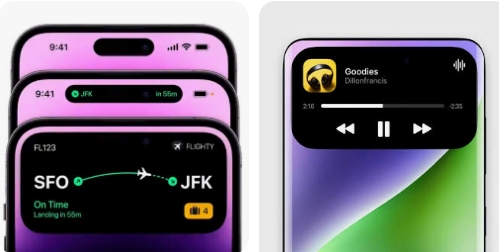
Want to get the Dynamic Island-style feature on your Android phone? With a Dynamic Island app, you can add an iPhone-inspired notification area to the top of your Android screen and make notifications, music controls, charging information, and other alerts easier to access.
If your Android smartphone does not have a built-in Dynamic Island feature, you can use a third-party Dynamic Island app to recreate a similar experience.
What Is a Dynamic Island App?
A Dynamic Island app is an Android application that creates a small interactive popup around the front camera or notification area of your phone. It is inspired by Apple’s Dynamic Island feature introduced on newer iPhone models.
Depending on the application and your Android version, the popup can display information such as:
- Incoming notifications
- Music playback controls
- Battery and charging status
- Bluetooth connections
- Calls
- Timers and alarms
- Headphone connections
- Other system events
The appearance and available features can vary depending on the app and your smartphone.
Download Dynamic Island App APK
If you want to install a Dynamic Island-style feature on Android, you can download the APK file of a compatible application and install it manually.
Before installing an APK, make sure you are downloading it from a trusted source. Avoid modified or suspicious APK files because they may contain unwanted software.
After downloading the APK, open the file and follow the Android installation instructions. If Android blocks the installation, you may need to allow installation from the browser or file manager you used to download the APK.
How to Set Up Dynamic Island on Android
After installing the application, open it and grant the permissions requested by the app. Depending on the application, you may need to enable notification access, display-over-other-apps permission, or accessibility access.
Once the required permissions are enabled, customize the position and size of the Dynamic Island-style popup so that it fits your phone’s camera and screen.
You can usually adjust options such as the popup position, width, height, animation, notification behavior, and supported applications.
Does Dynamic Island Work on All Android Phones?
Most Dynamic Island-style apps can work on many Android smartphones, including devices from Samsung, Xiaomi, Redmi, POCO, Motorola, Realme, OPPO, Vivo, OnePlus, Tecno, Infinix, and other manufacturers.
However, the exact appearance and functionality may depend on your Android version, screen design, camera position, and system permissions.
Is Dynamic Island Available on Samsung?
Samsung phones generally do not have Apple’s Dynamic Island feature built into One UI. However, compatible third-party applications can create a similar Dynamic Island-style notification popup.
This can be useful if you want to make your Samsung phone look more like an iPhone while keeping the standard Android interface.
Final Words
A Dynamic Island app is an easy way to add an iPhone-inspired notification and status popup to an Android smartphone. After installing the APK and granting the necessary permissions, you can customize the feature to match your phone’s screen and use it for notifications, music, charging information, calls, and other alerts.
Always download APK files from reliable sources and check the permissions requested by the application before installing it.
Official website:
no
OS:
Android
Interface:
English
